Authoring topologies
How to turn a real network into Marrow YAML — identifiers, devices, links, ports, status, and annotations.
A topology file has four parts: a header, zones, devices, and links.
Everything else is detail hung off those. The complete key-by-key listing is in
the schema reference; this page is about judgment.
Start from the story
Before writing YAML, decide what the diagram is for. The same site produces very different files depending on the answer:
- "Where does traffic go?" → tiers on every device, links carry
speedandkind. - "What's in each building?" → zones per site, tiers secondary.
- "How is it segmented?" →
modeon links: trunk/access VLANs, routed L3, VPN tunnels, LACP bundles. - "What's broken right now?" →
statuson devices and links, notes explaining each one. - "What does this branch look like?" → hub-and-spoke, spokes connected only to the hub.
Marrow renders what you declare. A diagram that tries to answer all four at once answers none of them well.
Identifiers
Every id is kebab-case: [a-z0-9._-], starting with a letter or digit.
They must be unique across devices, and separately unique across zones.
id: core-sw-01        # good
id: dc1.core.sw01     # good — dots and underscores are allowed
id: Core SW 01        # error MRW-E012 — uppercase and spaces
Pick a convention and hold it. IDs appear in link endpoints, in ha_pair_with,
in URLs on multi-page sites, and in every diagnostic — a consistent scheme is
the difference between a readable diff and an unreadable one.
name: is the human label and is free text. If you omit it, the id is used.
Devices
Only id and icon are truly required, but a device with nothing else
declared gives the engine nothing to work with:
devices:
  - id: core-sw-01
    name: Core Switch 1
    icon: cisco/switches/layer-3-switch   # required — search, never guess
    tier: core                            # core|distribution|access|edge|endpoint|management
    zone: campus                          # must be a declared zone id
    role: L3 core                         # free text, shown in the inspector
    status: up                            # up|down|degraded|planned|unknown
    mgmt_ip: 10.0.0.1
    ha_pair_with: core-sw-02              # declare on BOTH devices
    note: Change freeze until Q3
    config: |
      hostname core-sw-01
      ip routing
    interfaces:
      - name: Gi1/0/1
        description: uplink to dist-01
        vlan: 10
        ip: 10.0.0.1
note and config are the two keys that pay for themselves later. They show in
the inspector, and on large topologies a device carrying either one earns its
own dedicated page in the built site.
ha_pair_with must be declared on both devices. The engine does not infer
the reverse direction, and a one-sided declaration is a common cause of "why
didn't my pair sit together?".
Links
A link is from and to, each device-id:Port or bare device-id:
links:
  - from: core-sw-01:Gi1/0/1
    to: acc-sw-01:Gi0/48
    kind: fiber                # PHYSICAL: copper|fiber|dac|wireless|virtual|wan|serial
    speed: 10G                 # 10M|100M|1G|2.5G|5G|10G|25G|40G|100G|400G
    mode: trunk                # LOGICAL: access|trunk|routed|tunnel|peering|stack
    vlans: "10,20,30"          # what the trunk carries (native_vlan: N for the untagged one)
    status: up
    animated: true
    note: packet loss 12%
Only the first colon splits device from port. core-01:Gi1/0/1 parses as
device core-01, port Gi1/0/1 — the slashes are part of the port name, which
is what you want. An id containing a colon cannot be expressed; ids are
kebab-case so this never comes up.
Two axes: the cable, and what it carries. kind/speed describe the
physical link; mode describes its logical function. They compose — a 10G fiber cable can be an access port, a trunk, or a routed L3 link. speed drives
stroke width; status drives colour; mode drives the symbol:
mode: | Real Diagram Symbol | Visual Pattern | Companion keys |
|---|---|---|---|
access | Plain single line | vlans (the single VLAN) | |
trunk | Double rail casing | vlans, native_vlan | |
routed | Solid + protocol chip | protocol | |
peering | Dotted control-plane | protocol (ospf/ebgp/…) | |
tunnel | Dashed + security chip | encap (ipsec/gre/vxlan/…) | |
stack | Heavy backplane bar | — |
Like structure, meaning is declared, never guessed — the engine will not
infer trunk from a port name. The exact VLANs/encap/protocol ride a small chip
so the pattern stays uncluttered. Mismatched attributes (e.g. encap on a
non-tunnel link) are advisory MRW-W105 warnings, not errors.
LAGs. Give the members a shared lag id — they bundle onto one strand
chipped with that id (PO1); add lacp: active|passive|on|static|pagp to name
the control protocol. Aggregation is orthogonal to mode, so a port-channel can
be a trunk, an access, or a routed bundle. Use lag for port channels only, not
as a general grouping key.
animated: true draws a flowing dash. It's loud on purpose. One or two per
diagram to mark the path that matters; a diagram where everything is animated
communicates nothing.
Status
status is a declaration in the file, not a live reading. Marrow never
polls anything.
| Value | Device State | Link State | Semantics |
|---|---|---|---|
up (default) | Healthy, passing traffic | ||
down | Hard failure, line down | ||
degraded | Amber dashes, impaired service | ||
planned | Dotted slate, maintenance / staging | ||
unknown | — | Unpolled or uninstrumented |
If you want live status, generate the YAML from your monitoring system on a schedule and rebuild. That's a legitimate and common pattern — the file is the interface.
Ports and interfaces
Two different things, easy to conflate:
- Interfaces (
interfaces:on a device) are documentation. They appear in the inspector and on device pages. - Ports (the part after the colon in a link endpoint) are geometry. Marrow places a port chip on the device's edge and routes the cable to it.
They don't have to match — a link may use a port you never listed under
interfaces — but a topology where they agree produces a far more useful
inspector.
Reusing the same port on two links raises warning MRW-W101. That's usually a
copy-paste mistake, occasionally a legitimate shared physical port.
Hero, theme, description
marrow: 2
name: Marrow Global HQ
description: Core + distribution, three buildings   # watermark subtitle
theme: dark            # dark (default) | light
hero: core-sw-01       # the camera features this device on open
hero sets where the reader's eye lands first. Choose the device the diagram is
about. You can also set hero: true on a device rather than naming it at the
top; do one or the other.
Private annotations
Any key prefixed with x- is preserved and ignored:
devices:
  - id: core-sw-01
    icon: cisco/switches/layer-3-switch
    x-owner: netops
    x-asset-tag: A-99213
    x-cmdb-id: CI0004421
Unknown keys without the prefix are errors (MRW-E005). That is deliberate —
a silently ignored typo like teir: core would quietly change your layout. See
ADR-0006.
Custom fields and inspector sections
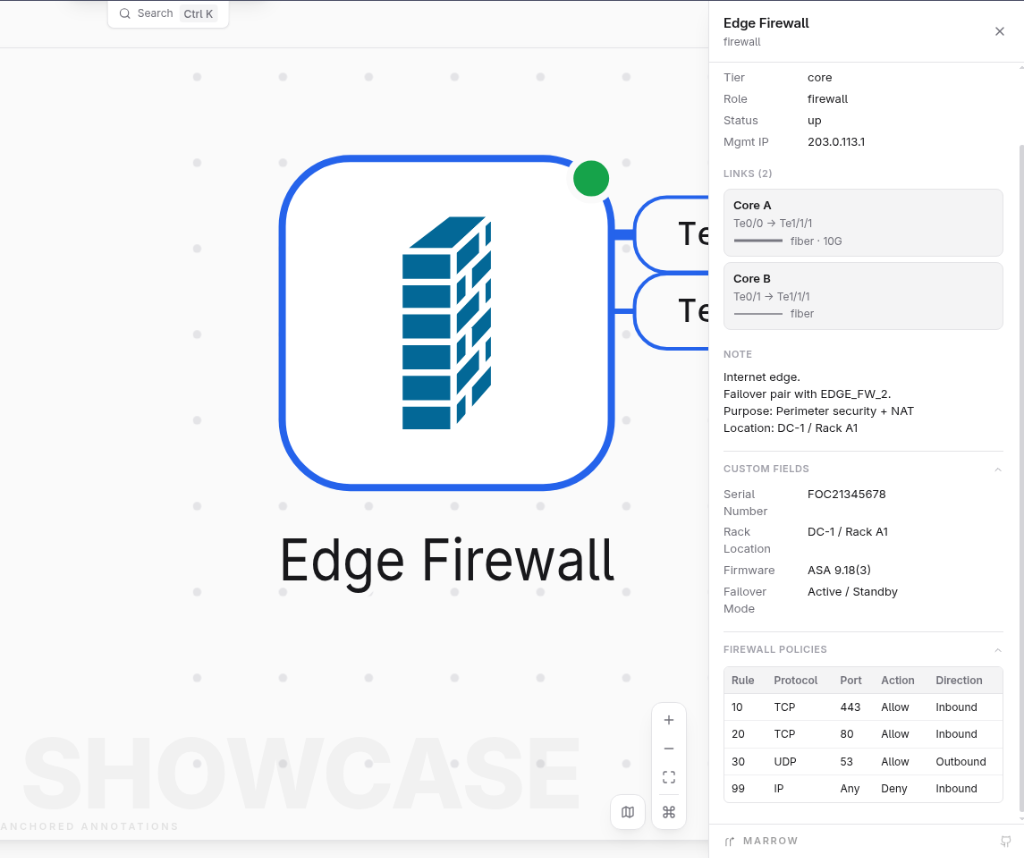
Enrich device and link inspection drawers with arbitrary metadata, tabular operational facts, or markdown documentation using custom_fields and sections:
devices:
  - id: core-01
    name: Core Switch 1
    icon: cisco/switches/layer-3-switch
    tier: core
    custom_fields:
      Serial Number: "FOC2049102"
      Asset Tag: "AT-99104"
      IOS Version: "17.9.4"
      Management IP: "192.168.1.1"
    sections:
      BGP Neighbors:
        - Peer: "192.168.1.2"
          AS: 65001
          Status: "Established"
          Prefixes: 42
      Interface State: |
        | Interface | IP Address | Status | Protocol |
        | Et0/1     | 10.0.1.1   | Up     | Up       |
        | Et0/2     | 10.0.2.1   | Up     | Up       |
links:
  - from: core-01:Et0/2
    to: core-02:Et0/2
    custom_fields:
      Link Type: "Backbone"
      MTU: 9216
    sections:
      OSPF Metrics: "Area 0 · Cost 1 · State Full"
The runtime inspector translates custom_fields into a structured definition list (<dl class="m-facts">). sections render collapsible drawer tabs (<details open>) supporting three data formats:
- Key-value objects: Renders a formatted facts list for inventory attributes or environmental readings.
- Arrays of objects: Renders an auto-formatted HTML table with inferred column headers for route tables or neighbor inventories.
- Markdown strings: Parses tables, bold text, italics, and inline code blocks without external dependencies.
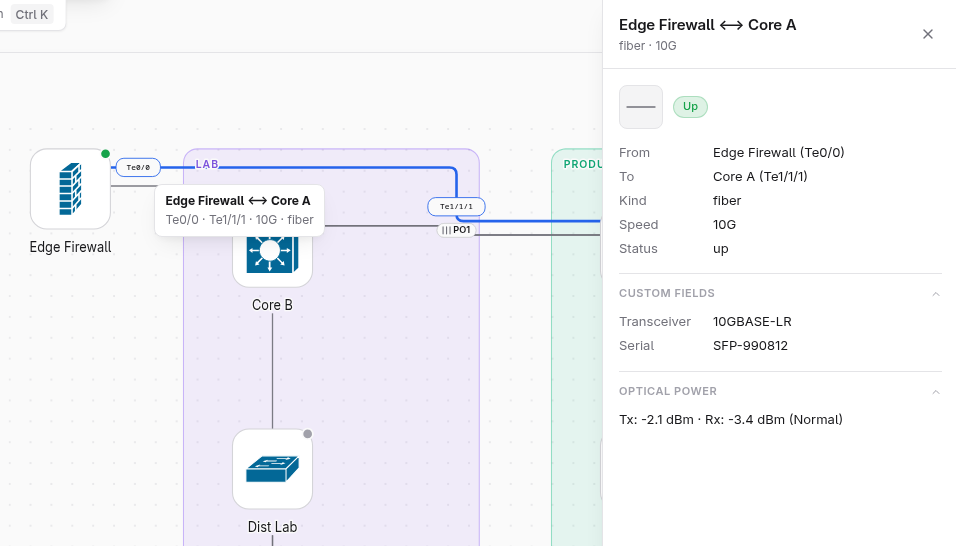
Edges in SVG viewports are clickable elements. Clicking any cable or bundle opens a dedicated link inspector drawer displaying endpoint ports, physical medium, link mode, notes, custom fields, and custom sections.
Engineering blueprint metadata
Topologies can declare formal engineering metadata stamped into static exports (SVG and PNG):
marrow: 2
name: Enterprise Backbone
author: NetOps Architecture Team
revision: v2.4
date: "2026-10-18"
title_block:
  title: Datacenter Spine Fabric
  author: NetOps Architecture Team
  revision: v2.4
  date: "2026-10-18"
logo: brand/custom-logo.svgtitle: The title displayed in the title block (defaults toname:).author: Engineering team or architect responsible for the diagram.revision: Version identifier (e.g.v1.0,rev-C,2026.Q4).date: ISO date string (YYYY-MM-DD). Defaults to compilation date if omitted.logo: Optional path to an SVG mark embedded in the title block.
Diagram documentation and "About this diagram"
Topologies can provide architectural context, operational runbooks, and team contacts using the root about: declaration:
marrow: 2
name: Spine-Leaf EVPN Migration
author: Data Center Architecture Team
revision: v1.4
date: "2026-10-19"
about:
  Architecture Overview: |
    - Clos 5-stage topology with 100G QSFP28 uplinks
    - BGP EVPN control plane with VXLAN encapsulation
    - Distributed Anycast Gateway on all leaf switches
  Change Window Notes: |
    - Maintenance window: 02:00–04:00 UTC
    - Pre-change snapshot required on all core spines
  Operational Contacts:
    NOC Hotline: "+1-800-555-0199"
    Escalation Slack: "#dc-ops-bridge"
Clicking Help > About this diagram in the menubar opens an interactive CAD blueprint document dialog modal:
- Quick metadata pills: Displays Author, Revision, Date, Device count, Link count, and Zone count in the header.
- Custom content & Markdown: Renders collapsible sections, formatted tables, or freeform Markdown notes declared under
about:. - Default fallback: If
about:is omitted, displays core topology specifications (engine tier, device count, link count) alongside an authoring guide tip. - Marrow watermarked credit: Features an authentic, low-opacity Marrow arrowhead watermark across the modal background and an "Engineered with Marrow" badge linking to the project repository.
Example topologies
The repository includes four reference topologies located in input/ that illustrate architecture patterns, layout archetypes, and schema features:
input/branch-hq.yaml: Multi-vendor branch discovery lab featuring Cisco CDP and multi-vendor LLDP zones, routed backbones, and custom BGP inspection tables.input/feature-showcase.v2.yaml: Full schema showcase demonstrating tiers, zones, status LEDs, LAG bundles, VLAN chips, hero highlighting, port chips, custom fields, sections, density presets (density: spacious), and scaling (scale: 1.15).input/global-enterprise.yaml: Large-scale enterprise fabric containing over 15,000 simulated devices, 194 locations, EVPN/VXLAN data centers, cloud on-ramps, and multi-tier zone nesting.input/multivendor_discovery.v2.yaml: Discovery lab generated from multi-vendor switch and router neighbors across Cisco and open network devices.
Test, inspect, and compile these reference topologies using the command line:
# Validate schema and reference constraints
npm run marrow -- validate input/branch-hq.yaml --json

# Build offline interactive HTML output
npm run marrow -- build input/feature-showcase.v2.yaml -o output/showcase.html

# Start live preview server with hot reload
npm run marrow -- serve input
A checklist before you say it's done
validatepasses with zero errors.- You have looked at a snapshot or the live preview.
- Every device that matters has a
tieror azone— meaning is declared, not implied by its name. ha_pair_withis declared on both sides of each pair.- No credentials, no secrets, no real management passwords anywhere in the file.
- Warnings are either fixed or understood.