Embedding diagrams
Put a Marrow diagram inside an existing docs site, wiki, or portal — and keep it current in CI.
A built diagram is an HTML document, not a fragment. That makes embedding
simple and slightly opinionated: you embed it in an <iframe> rather than
splicing its markup into your page.
The basic embed
<iframe
  src="/diagrams/branch.html"
  title="Branch office network"
  loading="lazy"
  style="width:100%; height:640px; border:1px solid #27272a; border-radius:12px"
></iframe>
That's the whole integration. The diagram brings its own styles and runtime, so it cannot collide with your site's CSS — which is exactly why the iframe is the right container rather than a limitation.
Height matters more than width. A network diagram in a 300 px strip is unreadable; 560–720 px is a sensible range for an inline figure, and a full-viewport height for a dedicated page.
Embed and kiosk modes
When embedding a diagram inside a dashboard, blog post, or kiosk display, strip extraneous chrome using URL query parameters or hash fragments:
<!-- Minimal chrome: hides breadcrumbs, search dock, sidebar, and backdrop frame -->
<iframe
  src="/diagrams/branch.html?chrome=minimal"
  title="Branch Office Network"
  style="width:100%; height:600px; border:none;"
></iframe>
Marrow executes an inline script synchronously in the <head> to evaluate parameters before first paint, preventing flashes of unstyled content (FOUC). Both query strings and hash fragments are supported:
| Parameter / Hash Flag | Values | Effect |
|---|---|---|
chrome | minimal | full | minimal hides topbar breadcrumbs, search dock, sidebar rail, and backdrop strip. Controls and canvas remain interactive. |
inspector | off | on | off suppresses the right-hand inspector drawer on device or link click. |
minimap | off | on | off hides the bottom-right minimap navigation overlay. |
theme | dark | light | Overrides the authored topology theme for the session. |
export_title | on | off | Controls whether title blocks are stamped during static PNG/SVG exports. |
export_legend | on | off | Controls whether dynamic auto-legends are generated during static exports. |
export_ports | on | off | Controls whether interface port chips are forced visible during exports. |
#embed=true | boolean | Shortcut equivalent to ?chrome=minimal. |
Flags can be combined via query parameters (?chrome=minimal&inspector=off&minimap=off) or hash fragments (#chrome=minimal;inspector=off;minimap=off). Because hash changes do not reload the page, parent frames can toggle UI chrome dynamically by modifying iframe.src = url + '#chrome=minimal'.
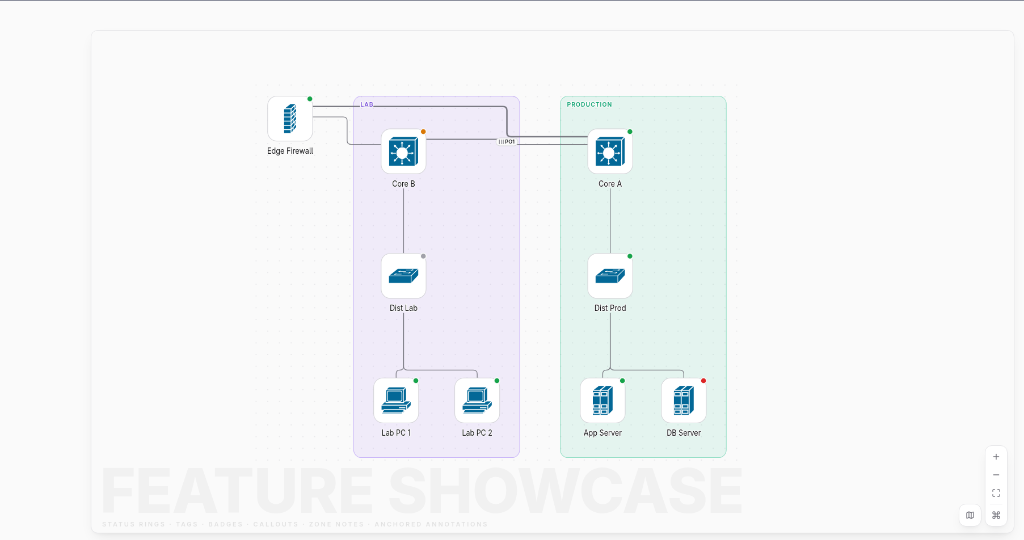
Theme
A diagram carries the theme from its topology's theme: key — dark, light,
or auto. In an embed you usually want it to match the host page, and there are
two ways to get that without rebuilding the file.
Follow the viewer's OS — theme: auto
theme: autoThe diagram resolves dark/light from the viewer's prefers-color-scheme
before it paints, and switches live if they change it. No host code — a sensible
default for a diagram embedded on a site that itself follows the OS.
Follow the host's own toggle — postMessage
If your page has its own light/dark switch, drive the diagram over postMessage.
The diagram announces itself when its runtime is ready; answer with the theme,
and re-send whenever yours changes:
const frame = document.querySelector('iframe.marrow');

addEventListener('message', (e) => {
  if (e.data?.type === 'marrow:ready') sendTheme();   // answer the ready ping
});
function sendTheme() {
  const theme = document.documentElement.classList.contains('dark') ? 'dark' : 'light';
  frame.contentWindow.postMessage({ type: 'marrow:theme', theme }, '*');
}
The message is { type: 'marrow:theme', theme: 'dark' | 'light' | 'auto' }. A
host-driven theme overrides the baked theme: and isn't persisted — opening the
same file standalone still shows its authored theme — and it works whatever
theme: the file was built with.
Bi-Directional postMessage Protocol
Bi-Directional postMessage Protocol
Event bus connecting parent portal (Next.js/React) with isolated Marrow diagram
postMessage({ type: 'marrow:theme', theme: 'dark' })postMessage({ type: 'marrow:select', deviceId: 'sw-01' })parent.postMessage({ type: 'marrow:ready' })parent.postMessage({ type: 'marrow:selected', id })React & Next.js component (<MarrowEmbed />)
For Next.js, Vite, or React applications, install the official shadcn-compatible <MarrowEmbed /> component (also exported as <TopologyCanvas />):
npx shadcn@latest add https://marrowdiagram.vercel.app/r/topology-canvas.jsonOr import directly from @marrow/ui:
import { MarrowEmbed } from '@marrow/ui';

export function NetworkDashboard() {
  return (
    <MarrowEmbed
      src="/diagrams/campus.html"
      title="Campus Core Network"
      chrome="minimal"
      inspector="on"
      minimap="on"
      theme="auto"
      height="650px"
      floatingActions={true}
    />
  );
}
The component automatically manages:
- Zero FOUC theme synchronization: Subscribes to host DOM dark/light mutations and forwards theme updates via
postMessage. - Fullscreen Mode: Integrated camera action button toggling full-viewport presentation.
- Standalone Launch: Direct external link button to open the self-contained diagram in a dedicated tab.
- Hash Flag Pre-boot: Sets minimal chrome, inspector, and minimap flags before the initial paint.
Linking straight to a device
Multi-page sites have real URLs, so you can deep-link:
/diagrams/global/index.html              overview
/diagrams/global/zones/campus.html       one zone
/diagrams/global/devices/core-sw-01.html one device
/diagrams/global/inventory.html          the table
Linking to a device page from a runbook is often more useful than embedding the whole diagram.
Content Security Policy
The output loads nothing external, so a strict policy is fine. What it does need is inline styles and inline script — everything is inlined by design:
frame-src 'self';on the host page, and for the diagram document itself:
default-src 'none'; img-src 'self' data:; style-src 'unsafe-inline'; script-src 'unsafe-inline';If your platform forbids inline script outright, single-file output won't run
there. Use the multi-page site shape instead — its runtime and styles are
separate files under assets/, which a hash- or nonce-based policy can
handle.
JavaScript Client API (window.marrow)
When embedded in a portal or host application, Marrow exposes a global window.marrow object for programmatic camera navigation, element selection, lifecycle events, and dynamic inspector tabs.
Programmatic camera and selection
Host portals can control focus and camera movement directly:
// Focus a specific device and smoothly fly camera to it
window.marrow.selectDevice('core-sw-01', true);

// Select an interconnect cable and open the link inspector
window.marrow.selectLink('core-sw-01--dist-sw-01#0');

// Clear selection and close inspector drawer
window.marrow.deselect();

// Retrieve currently inspected item
const current = window.marrow.getSelected();
// returns { type: 'device', item: DataDevice } | { type: 'edge', item: DataLink } | null

// Open the "About this diagram" document modal
window.marrow.openAbout();
Event listeners
Subscribe to viewer interactions using marrow.on(event, handler):
// Listen for selection changes (device or link)
const unsubSelect = window.marrow.on('select', (selection) => {
  console.log('Selected:', selection.type, selection.item.name ?? selection.item.id);
});

// Listen for deselection
const unsubDeselect = window.marrow.on('deselect', () => {
  console.log('Selection cleared');
});

// Listen for inspector tab switches
const unsubTab = window.marrow.on('tabchange', (tabId) => {
  console.log('Active inspector tab:', tabId);
});
Dynamic custom inspector tabs
Host applications can inject custom tabs into the inspector drawer dynamically at runtime:
// Register a live telemetry tab with custom DOM rendering and cleanup
const unregister = window.marrow.inspector.registerTab({
  id: 'live-telemetry',
  label: 'Live Telemetry',
  target: 'device', // 'device' | 'edge' | 'both'
  order: 40,
  visible: (device) => device.role === 'router',
  render: (device, container) => {
    container.innerHTML = `
      <div class="m-inspector-section">
        <h3>Live Traffic (${device.name})</h3>
        <p>Inbound: 14.2 Gbps · Outbound: 9.8 Gbps</p>
      </div>
    `;
    const interval = setInterval(() => {
      // Poll or update live stats
    }, 2000);

    // Return cleanup callback invoked when tab is closed or selection changes
    return () => clearInterval(interval);
  },
});
Keeping it current in CI
The diagram is generated, so treat it like any other build artifact. A minimal GitHub Actions job:
name: diagrams
on:
  push:
    paths: ['input/**.yaml']

jobs:
  build:
    runs-on: ubuntu-latest
    steps:
      - uses: actions/checkout@v4
      - uses: actions/setup-node@v4
        with: { node-version: 24 }
      - run: npm ci && npm run compile
      - run: npm run marrow -- icons fetch --yes      # if you use cloud packs
      - run: npm run marrow -- validate input/*.yaml  # exit 1 on errors
      - run: npm run marrow -- build input/branch.yaml -o site/diagrams/branch.html
      - uses: actions/upload-artifact@v4
        with: { name: diagrams, path: site/diagrams }
validate exits 1 on validation errors and 2 on usage or I/O errors, so
it gates a pipeline correctly with no extra scripting. Add --json if you want
to post the diagnostics somewhere.
Because output is deterministic, committing the built HTML produces a clean diff: the file only changes when the topology actually changed.
Interactive Demo Studio & UI Suite
Explore real, interactive compiled diagrams across all layout archetypes in our live Interactive Demo Studio.
To build custom network dashboards and network operating centers (NOCs) with these components, browse the Marrow UI Component Catalog.