Zones & tiers
The two keys that shape every Marrow diagram — how they interact, when to use which, and how nesting and collapse behave.
zone and tier are the load-bearing keys. Almost every "why does my diagram
look like that?" traces back to one of them being missing, wrong, or fighting
the other.
  zone  →  WHERE something is   →  a spatial container (site, building, VLAN, VPC)
  tier  →  WHAT ROLE it plays   →  a vertical rank (edge → core → dist → access → endpoint)
They are orthogonal. A device can have both, either, or neither.
Tiers
Vertical Tier Hierarchy
ELK layered ranks ordered top-to-bottom across 5 structural tiers
Six values, ranked top to bottom on the page:
| Tier | Vertical Position | Typical use | Layout Layer |
|---|---|---|---|
edge | Rank 0 (Top) | WAN routers, perimeter firewalls, internet handoff | ▲ Perimeter Layer |
core | Rank 1 | L3 core, high-speed backbone, spine | ● Core Fabric |
distribution | Rank 2 | Aggregation, policy control, leaf switches | ◆ Distribution Ring |
access | Rank 3 | Access switches, wiring closets, ToR, APs | ■ Access Boundary |
endpoint | Rank 4 (Bottom) | Bare-metal servers, hypervisors, PCs, IoT | ▼ Workload Layer |
management | Rank 4 (Bottom) | OOB switches, terminal servers, jump hosts | ▼ Out-of-Band Plane |
endpoint and management share rank 4 — they sit on the same row.
Tiers only take over the layout when every device declares one. A single
device without a tier drops the whole topology out of tiered classification.
That is the single most common surprise. If your three-tier network came out
looking flat, run down the device list looking for the one that's missing tier:.
# this is tiered
- { id: rt-01,  icon: ..., tier: edge }
- { id: sw-01,  icon: ..., tier: core }
- { id: srv-01, icon: ..., tier: endpoint }

# this is NOT tiered — srv-01 has no tier, so the whole diagram falls back to flat
- { id: rt-01,  icon: ..., tier: edge }
- { id: sw-01,  icon: ..., tier: core }
- { id: srv-01, icon: ... }
Zones
A zone is a container drawn as a tinted panel with a title. Its contents are laid out on their own and then packed against the other zones.
zones:
  - id: campus
    name: Campus
    accent: "#7aa2ff"      # tints the panel
    collapse: auto         # auto | open | closed
  - id: bldg-a
    name: Building A
    parent: campus         # nesting
Two or more zones containing devices switches the layout to the zoned mosaic, and that outranks tiers. Inside each zone, tiers still order devices vertically — so zones and tiers compose rather than compete. Zones decide the big shape; tiers decide the shape within.
Reference topology: input/zoned-hierarchy.yaml
A complete multi-zone and multi-tier reference topology is available at input/zoned-hierarchy.yaml. It demonstrates how spatial containment (Production and Lab zones) pairs with vertical tier hierarchy (edge $\to$ core $\to$ distribution $\to$ access $\to$ endpoint), dual-uplink HA distribution pairs (ha_pair_with), and curved spline edge routing across zone boundaries.
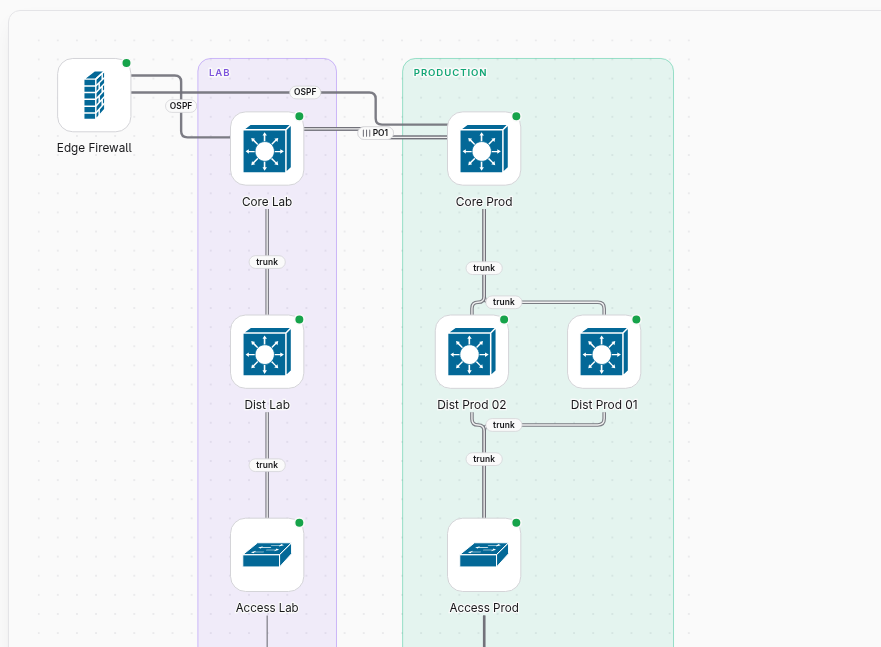
Use zones for things that are genuinely somewhere: sites, buildings, floors, VLANs, VPCs, OT versus IT, DMZ versus internal. Don't use them as a tagging system — a zone with two devices in it is a box that costs more than it explains.
Nesting
parent nests zones arbitrarily deep. Cycles are an error (MRW-E016).
zones:
  - { id: emea,     name: EMEA }
  - { id: london,   name: London,   parent: emea }
  - { id: ldn-dc1,  name: LDN-DC1,  parent: london }
On a multi-page site, only top-level zones get their own page; a page covers its whole subtree. So the nesting level you choose determines the page granularity of the built site.
Collapse
| Value | Behavior |
|---|---|
auto (default) | The engine decides from the zone's size |
open | Always expanded |
closed | Always collapsed to a summary tile with a device count |
closed is how you keep a huge but uninteresting zone (500 desktops) from
dominating a diagram that's actually about the core.
Choosing between them
| Situation | Reach for |
|---|---|
| Classic three-tier campus, one site | Tiers only |
| Several buildings or sites | Zones (+ tiers inside each) |
| Cloud VPCs / subscriptions | Zones per VPC or account |
| Hub-and-spoke WAN, many branches | Neither — let hub-spoke classification take over |
| OT/IT segmentation, DMZ | Zones — the boundary is the point |
| One flat lab of 8 boxes | Neither |
Common failures
"My zones didn't render as panels." You need two or more zones that actually contain devices. One zone is not a mosaic; the engine ignores it as a layout signal.
"Everything is in one column." Every device probably landed in the same tier, or none declared a tier and the fallback flat layout kicked in.
"My HA pair is on opposite sides." ha_pair_with needs to be on both
devices. Also check they're in the same zone — the engine won't pull a device
out of its declared zone to sit next to its partner.
"A zone panel is enormous and empty." An empty zone raises MRW-W102. Either
put devices in it or delete it.
Meaning is declared, never guessed. The engine will not read
core-sw-01 and conclude the device is core, and it will not infer that
dc1-* devices belong together. If you want structure, say so.
Next: how layout is chosen.